카테고리 없음
24.07.08 TIL
rlarudals
2024. 7. 8. 20:50
오늘은 팀 과제 4번을 진행하였다.
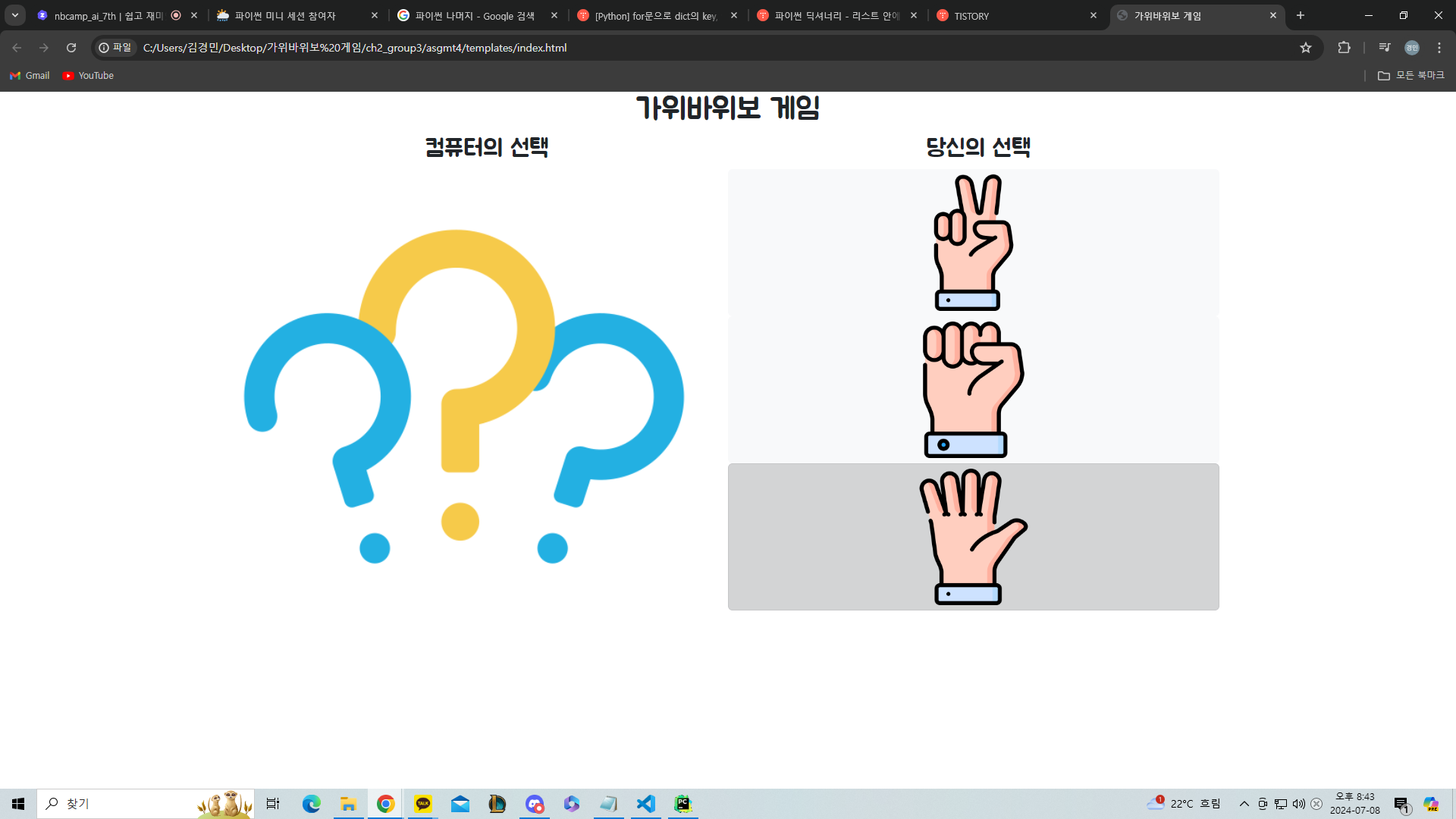
가위바위보 게임 홈페이지를 만드는 것을 진행했다.
<html lang="ko">
<head>
<meta charset="UTF-8">
<meta name="viewport" content="width=device-width, initial-scale=1.0">
<title>가위바위보 게임</title>
<link rel="stylesheet" href="styles.css">
<link href="https://cdn.jsdelivr.net/npm/bootstrap@5.3.3/dist/css/bootstrap.min.css" rel="stylesheet"
integrity="sha384-QWTKZyjpPEjISv5WaRU9OFeRpok6YctnYmDr5pNlyT2bRjXh0JMhjY6hW+ALEwIH" crossorigin="anonymous">
integrity="sha384-YvpcrYf0tY3lHB60NNkmXc5s9fDVZLESaAA55NDzOxhy9GkcIdslK1eN7N6jIeHz"
crossorigin="anonymous"></script>
<style>
* {
font-family: "Jua", sans-serif;
font-weight: 400;
font-style: normal;
}
h1 {
text-align: center;
}
.computer {
display: flex;
justify-content: space-around;
align-items: center;
}
.user {
display: flex;
flex-direction: column;
float: none;
justify-content: center;
margin-left: 50%;
}
.btn {
display: flex;
justify-content: center;
}
#screen_left {
width: 648px;
height: 600px;
float: left;
}
</style>
</head>
<body>
<h1>가위바위보 게임</h1>
<div class="container">
<div class="game">
<div class="computer">
<h2>컴퓨터의 선택</h2>
<h2>당신의 선택</h2>
</div>
<div id="screen_left"> <img src="https://ifh.cc/g/xZ5A30.png" style="width: 600px; height: auto;" alt=""> </div>

<!-- Button trigger modal -->
<div class="right">
<div class="user">
<button type="button" class="btn btn-light" data-bs-toggle="modal" data-bs-target="#exampleModal">

</button>
<button type="button" class="btn btn-light" data-bs-toggle="modal" data-bs-target="#exampleModal">

</button>
<button type="button" class="btn btn-light" data-bs-toggle="modal" data-bs-target="#exampleModal">

</button>
</div>
<!-- Modal -->
<div class="modal fade" id="exampleModal" tabindex="-1" aria-labelledby="exampleModalLabel"
aria-hidden="true">
<div class="modal-dialog">
<div class="modal-content">
<div class="modal-header">
<h1 class="modal-title fs-5" id="exampleModalLabel">결과</h1>
<button type="button" class="btn-close" data-bs-dismiss="modal"
aria-label="Close"></button>
</div>
<div class="modal-body">
{{data.Result}}
</div>
<div class="modal-footer">
<button type="button" class="btn btn-secondary" data-bs-dismiss="modal">닫기</button>
<button type="button" class="btn btn-primary">결과값 저장</button>
</div>
</div>
</div>
</div>
<div id="result"></div>
</div>
</div>
</div>
<script>
function play(userChoice) {
const choices = ['가위', '바위', '보'];
const computerChoice = choices[Math.floor(Math.random() * choices.length)];
document.getElementById('computerChoice').innerText = computerChoice;
}
</script>
</body>
</html>
html 코드는 이렇게 되어 있다.
아직 미완성인 코드 이기에 완벽하게 되지도 않았고, 다른사람이 볼땐 굉장히 허접한 코드일 수도 있다.
하지만 이렇게라도 조금씩 나아가는 것을 아주 좋은 징조인것 같다.
상대적으로 파이썬만 하다 html 만들었는데 새롭게 알게 된게 있다.
<div id="screen_left">
바로 요것이다. 만들때 솔직히 별 생각 없이 만든 감이 없지 않아 있었다. 그래서 조금 애를 먹었는데 웬걸 저 코드를 쓰니 바로 해결이 됬다.
d = {'a': 15, 'b': 634, 'c': 124, 'd': -436, 'e': -235, 'f': 856, 'g': 23, 'h': 523}
total_sum = sum(d.values())
print(total_sum)
그리고 오늘 배운 것중 가장 중요한 것을 소개한다.
바로 values() = (딕셔너리에서 value 값만 출력) 이다.
다른사람들이 알고 있었는지는 몰라도 나는 이걸 오늘 처음 알았다.
이걸 쓰면 코드를 굉장히 짧게 쓸수 있게 됬다.
나는 오늘도 한층 더 강해졌다. 내일은 홈페이지 모달에 flask 를 적용해야한다.
이를 위해 오늘 새벽에 공부를 해야한다.